Photo Metadata Viewer — Check EXIF Data Online, Nothing Is Uploaded
Drop a photo below and see exactly what it secretly carries: the camera or phone that took it, when it was taken, the shooting settings, embedded text — and, if location tagging was on, the exact GPS coordinates as a map link. The inspection runs entirely in your browser: the file never leaves your device.
Drop a photo here or click to choose
JPEG or PNG · read locally · nothing is uploaded
What the viewer shows you
- Device and software. The exact phone or camera model and any app that touched the file — often enough to identify whose photo it is.
- Timestamps. When the photo was really taken, down to the second.
- GPS coordinates. If location tagging was on, you get a live map link — the same pin a stranger would get. This is the single most sensitive field for shared photos (read the GPS guide).
- Shooting settings. ISO, aperture, shutter speed and focal length; photographers can even read the EXIF shutter count on some bodies.
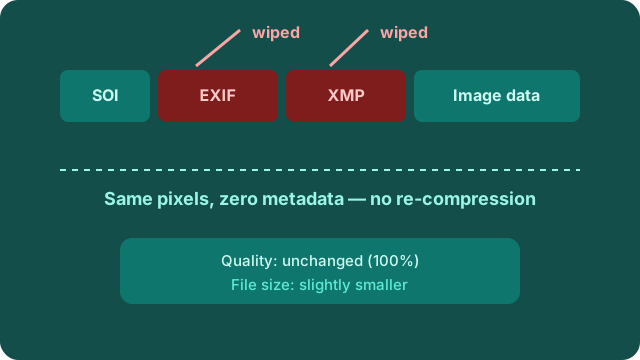
- Hidden blocks inventory. Every metadata section inside the file — EXIF, XMP, Photoshop data, comments — with sizes, so you know exactly what a wipe will remove.
Look before you share — then wipe
Checking first takes two seconds and tells you exactly what you are about to give away. Sellers can see whether a marketplace photo points at their home; parents can check school photos for geotags; anyone can confirm a downloaded image is clean before re-sharing it. If the viewer finds metadata, the fix is one drop: the wipe tool removes everything it listed, losslessly, and you can go unlimited when five files a day is not enough.
Frequently asked questions
Does checking upload my photo anywhere?
No. The reader runs entirely in your browser — the file is parsed in memory on your device and nothing is sent to any server.
What is the difference between viewing and wiping?
Viewing only reads the hidden data; wiping removes it from the file for good. A typical routine: inspect a photo here, then drop it into the wipe tool to strip everything it found.
Which formats can I inspect?
JPEG and PNG — the same formats the wipe tool supports. HEIC photos should be exported to JPEG first.