PhotoWipe Pricing — Free Forever, Unlimited When You Need It
Every wipe is lossless on every plan. Free covers five files a day — enough for the occasional marketplace listing. Unlimited exists for people who share photos for a living.
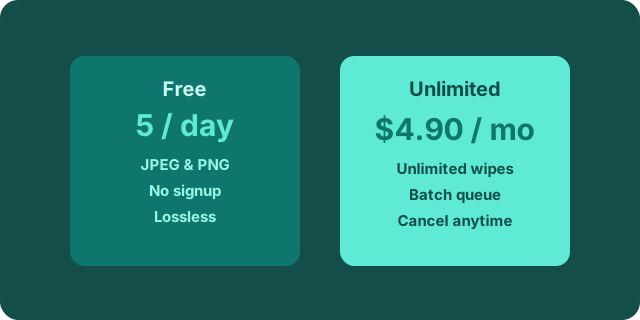
| Plan | Price | Wipes | Best for |
|---|---|---|---|
| Free | $0 | 5 files / day | Occasional listings, family photos, one-off checks |
| 500-file pack | $6.90 one-time | 500 files, never expire | A bulk job: exporting an old library, an archive sweep |
| Unlimited | $4.90 / month | Unlimited | Sellers, photographers, teams who wipe daily |
What counts as a file
Each photo you drop and process counts as one wipe, on every plan. A ten-photo batch is ten wipes — on the free plan that is two days' allowance, which is exactly why the pack and the subscription exist. Cleaned files are downloaded straight back; nothing sits in an account to manage. If a file fails to process — an unsupported format, say — it is not counted, so a mixed batch never burns your allowance on errors.
Do credits and subscriptions mix?
Yes, and in your favor: if you hold pack credits and an active subscription, wipes draw on the subscription first and keep your pack credits untouched for when the subscription lapses. There is no lock-in either direction — buy a pack today and subscribe next month if the volume keeps up.
Why there is a limit at all
Every wipe runs on real servers. The free daily allowance is funded by the people who upgrade, and five files a day covers honest personal use generously. If you hit the limit, Unlimited keeps the service independent and ad-free — there are no tracking pixels on this site and there never will be.
Manual methods vs PhotoWipe
Every operating system can strip metadata by hand. Windows lets you remove properties file by file (Properties → Details → remove), macOS exposes some data through Preview's inspector, and phones can share a location-free copy when you dig through the share sheet options. Those routes work — for one file, once. They share three problems: the menus move between OS versions, nobody remembers the exact clicks next month, and none of them handle a batch. By the fourth photo, "I'll do it manually" quietly becomes "I'll just send it as-is".
A dedicated wipe tool exists so the safe path is also the easy one: drop the whole batch, download the cleaned files, done. The trade is simple — a plan that costs less than one coffee per month versus a manual chore you will skip exactly when it matters.
Billing, refunds, cancellation
Checkout and payments are handled by Paddle as merchant of record: it collects VAT or sales tax where required, issues invoices, and runs the subscription portal where you can cancel in two clicks. Refund requests within 14 days of a charge are honored — email the address on your Paddle receipt and include your order number.
Frequently asked questions
What counts as one wipe?
One file processed is one wipe. Re-wiping the same file counts again — but wiped files carry no metadata, so wiping them twice does nothing.
Do pack credits expire?
No. Pack credits stay on your device account until you use them.
Can I cancel Unlimited anytime?
Yes. Cancel in the checkout provider's customer portal; the plan stays active until the end of the period you already paid for.
Who handles my payment?
Payments are processed by Paddle, which acts as merchant of record and handles VAT/sales tax. Card details never touch our servers.
Not sure yet? Try the free wipes, read the EXIF guide or the GPS guide.