Remove Metadata from PDF — What Your Documents Hide and How to Strip It
Every PDF quietly carries two blocks of hidden information: an /Info dictionary and an XMP metadata stream. Between them they list the author, the software that made the file, when it was created and edited — and, for Office exports, sometimes every revision. Here is what is inside, how to check your own files, and three safe ways to strip it before you send a document anywhere.
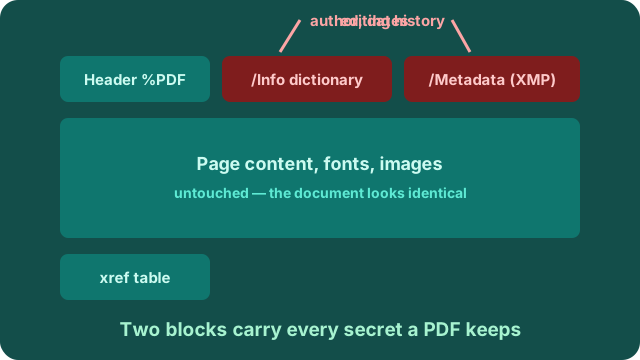
What metadata a PDF actually contains
Photos carry EXIF; documents carry their own twin. A typical PDF made by Word, PowerPoint, InDesign, your scanner or "Export to PDF" contains:
- Author and company. Whatever name the software was registered to — frequently the full real name of whoever exported the file.
- Creating application and version. "Microsoft Word 16.78" or "Acrobat Pro 24.2" tells a recipient exactly which tools made the document.
- Timestamps. Creation date, last modification date — down to the second.
- Edit history (XMP). Adobe and Office apps can embed a revision log: earlier versions, saved dates, sometimes comments — the PDF equivalent of photo EXIF.
- Scanner traces. Scanned PDFs may carry device model and capture settings in XMP.
Check what your PDF reveals
Three ways, from fastest to most complete: open the file in Acrobat (or any reader) → File → Properties → the Description tab lists author, producer and dates. On Windows, right-click → Properties → Details shows the same fields. For the full XMP stream, rename a copy to .txt and search for "xmp" — everything between the tags is readable plain text.
Three safe ways to strip PDF metadata
- Print to PDF. Open the document → Print → choose "Microsoft Print to PDF" (Windows) or "Save as PDF" (macOS). The printer output is a fresh file with no inherited metadata — the nuclear option, and it works on any document.
- Re-save from the source app. In Word: File → Info → Check for Issues → Inspect Document → remove Document Properties and Personal Information, then re-export. Acrobat Pro has the equivalent under Edit PDF → Sanitize Document.
- Examine before sending. Whatever route you use, re-open the new file's properties and confirm the author field is gone. Ten seconds of checking beats an awkward recall.
A candid note on scope: our PhotoWipe tool is photo-focused — it wipes JPEG and PNG files losslessly, and PDFs are a different beast: their cross-reference tables make naive byte surgery risky, and we would rather point you to the safe routes above than hand you a corrupted contract. For photos, the wipe tool remains the fast path — five files a day free.
Frequently asked questions
Does removing PDF metadata change how the document looks?
No. Metadata lives in separate blocks beside the page content. Anything that strips metadata — resaving, printing to PDF, or our export tricks — leaves the visible pages identical.
What metadata does a PDF contain?
The /Info dictionary and the XMP /Metadata stream: author, creating application and version, creation and modification timestamps, and sometimes edit history. Word, PowerPoint, InDesign and most scanners all write it automatically.
Why can I not wipe a PDF on PhotoWipe?
Our wipe engine is built for photos — JPEG and PNG — where it is lossless by construction. PDFs are structured documents; a wrong byte can break the cross-reference table, so we route PDFs to the safe manual methods above instead of risking a corrupted file.
Does printing to PDF reduce quality?
The print-to-PDF route re-renders the document, so text stays sharp and selectable, but embedded fonts may be substituted and some interactive features (forms, links) can be lost. For archives, prefer re-saving from the source app.
Related: what EXIF data is in photos · removing GPS tags · inspecting a photo's hidden data · plans and pricing.